Tilesets
Learn how to draw tiles from a tileset image
Tilesets are images containing multiple unique tiles. These tiles can be drawn to the screen multiple times in interesting combinations to produce things like backgrounds or draw larger objects.
Let’s start with the 2x2 tileset below which has with 4 different tiles:
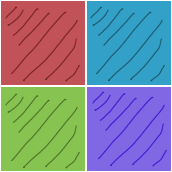
Each tile is 84 pixels tall and wide so this is what we’ll set our tile width and height to be. The tileset image has a 1 pixel padding around the entire image and a 2 pixel spacing between each tile, so we’ll set those values as well. Let’s define our tileset using our image:
tileset = Tileset.new(
  'tileset.png',
  tile_width: 84,
  tile_height: 84,
  padding: 1,
  spacing: 2,
)
Now that our tileset is defined we can define our individual tiles by giving them a name and specifying their x and y co-ordinates, here we go:
tileset.define('red', 0, 0)
tileset.define('blue', 1, 0)
tileset.define('green', 0, 1)
tileset.define('purple', 1, 1)
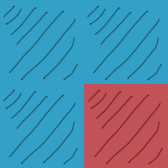
Now that we have defined some tiles we can draw them to the screen. Let’s place our blue and red tiles:
tileset.place('blue', [[0, 0], [84, 0], [0, 84]])
tileset.place('red',  [[84, 84]])
If you just need a single tile in a single spot, the bracket setter is even friendlier:
tileset[0, 0] = :blue
tileset[84, 84] = :red
Our tiles now look like this drawn to the screen:
One more thing we can do with tilesets is scale/rotate and flip them.
Scaling
We can scale all of our tiles by specifying the scale attribute (default: 1) on our tileset:
tileset = Tileset.new(
  'tileset.png',
  tile_width: 84,
  tile_height: 84,
  padding: 1,
  spacing: 2,
  scale: 2
)
By setting our scale to 2, each tile will be drawn with twice the width and height, in our example that would result in 168x168 pixel tiles
Rotating
Unlike most objects, a tileset has no whole-object rotate: a grid of tiles has no single pivot to spin around. Instead, tiles rotate individually, per tile type, by setting the rotate attribute when you define them:
tileset.define('red', 0, 0, rotate: 90)
Flipping
We can set the flip attribute to flip our tiles. It can either be set to :horizontal, :vertical, or :both:
tileset.define('red', 0, 0, flip: :both)
Tinting
The whole tileset can be tinted by setting tint, handy for things like flashing damage or recoloring a shared tile sheet:
tileset.tint = 'red'
Managing tiles
Once you’ve placed tiles, you can query and remove them with the same bracket syntax you use to place them:
tileset[x, y]      # get tile info at a screen position
tileset.delete(x, y)  # remove a tile at a screen position
tileset.clear         # remove all placed tiles
Continue to the next topic